
Car Key Battery Replacement Guide
Car Key Help & Advice
How to Replace a Car Key Fob Battery
A simple step-by-step guide to finding the right battery, opening your car key remote safely, and testing it afterwards.
Common Batteries
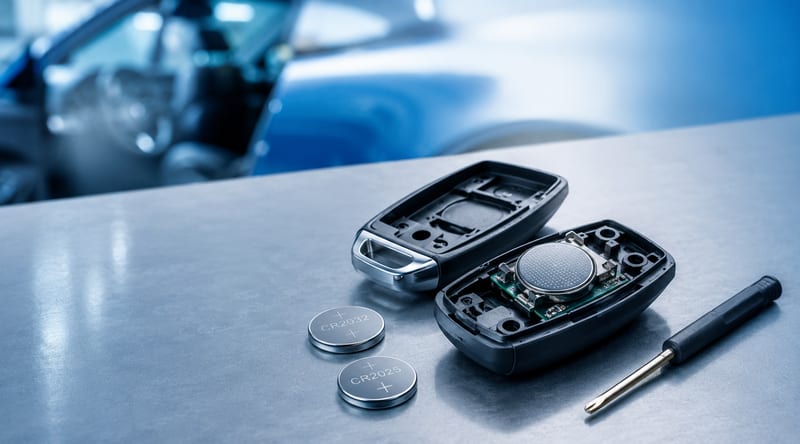
CR2032, CR2025 and CR2016 are the most common car key fob batteries.
Difficulty
Usually easy and takes just a few minutes with basic care.
Tools Needed
A coin, small flathead screwdriver, or key opening tool may be required.
Replacing a car key fob battery is one of the easiest DIY tasks you can do, yet many drivers are unsure where to start. If your remote locking has become weak, buttons only work close to the vehicle, or the key has stopped responding completely, a flat battery is often the most likely cause.
This guide explains how to identify the correct battery, open your car key remote safely, fit the new battery correctly, and check whether the remote is working again.
Signs Your Car Key Fob Battery Needs Replacing
- The remote only works when standing very close to the vehicle.
- You need to press the buttons several times before anything happens.
- The remote locking works intermittently.
- A warning appears on the dashboard saying the key battery is low.
- The buttons feel normal, but the vehicle does not respond.
Finding the Right Battery
Most car key remotes use small coin cell batteries, with the most common types being CR2032, CR2025, or CR2016. These batteries are widely available from supermarkets, hardware shops, and online retailers, often for under £3.
To find the correct battery, check the back of your remote, look inside the key once opened, or refer to your vehicle owner’s manual. Some car key batteries look very similar, so it is important to match the code exactly.
CR2032 batteries are slightly thicker than CR2025 and CR2016 batteries. Even if they look similar, fitting the wrong size can stop the key from closing properly or making good contact.
Opening the Remote Safely
Many car key remotes have a small slot, hidden latch, or emergency key blade that needs to be removed before the case can be opened. Use a coin, small flathead screwdriver, or plastic pry tool to gently separate the casing.
Never force the remote open. If the casing does not separate easily, check for hidden screws, clips, or a release button. Some premium remotes, including certain BMW and Mercedes keys, may require a specific opening tool or additional care to avoid damaging the shell.
Avoid using excessive force. Damaging the circuit board, rubber buttons, or internal clips could mean the key needs repairing or replacing.
Fitting the New Battery
Once the remote is open, carefully remove the old battery. Make a note of which way the battery is facing before removing it. In most key fobs, the positive “+” side faces upward, but this can vary depending on the key design.
Insert the new battery in the same direction as the old one, ensuring it sits flat and makes proper contact with the metal terminals. Once fitted, snap the key casing back together securely.
- Open the key remote carefully.
- Remove the old battery.
- Check the battery code and orientation.
- Fit the new battery with the correct side facing up.
- Close the case firmly without forcing it.
Testing the Car Key Fob
After replacing the battery, test all buttons within around 10 metres of the vehicle. Check the lock, unlock, boot release, and any additional remote functions.
If the remote still does not work, the issue may not be the battery. The key could need reprogramming, the circuit board may be damaged, or the vehicle may not be receiving the signal correctly.
Why Your Key Fob Still May Not Work
If a new battery does not solve the problem, there are a few possible reasons:
- The battery has been fitted the wrong way around.
- The battery contacts are bent, loose, or dirty.
- The remote buttons are worn or damaged.
- The circuit board inside the key has failed.
- The key has lost programming or synchronisation with the vehicle.
- The vehicle itself has a receiver, fuse, or locking issue.
Can I Replace a Car Key Battery Myself?
In most cases, yes. Replacing a car key fob battery is usually a simple job that can be done at home in a few minutes. However, if the key is sealed, damaged, expensive, or difficult to open, it may be safer to ask a professional auto locksmith or key specialist for help.
Taking extra care is especially important with smart keys and proximity keys, as replacement cases and internal components can be more expensive than standard remote keys.
Need Help With Your Car Key?
If your key fob still does not work after replacing the battery, Keystation can help with replacement car keys, remote key repairs, key shells, blades, and programming advice.
Contact KeystationFAQs About Car Key Fob Batteries
What is the most common car key fob battery?
The most common car key fob battery is usually a CR2032, although some remotes use CR2025 or CR2016 batteries.
Will my car key need reprogramming after a battery change?
Most keys do not need reprogramming after a simple battery replacement. However, if the remote still does not work, it may need resynchronising or checking by a specialist.
Can I damage my car key by opening it?
Yes, if too much force is used. Always open the key carefully and avoid touching or bending the circuit board.
How long does a car key battery last?
Most car key batteries last between 1 and 3 years, depending on usage and the type of remote.